はじめに
こんにちは、新卒1年目のmoriです。
私が現在 OJTで所属している部署では、ネットワーク機器やサーバーの監視にZabbixを用いています。
しかし、登録機器が増えすぎた結果、情報の記録に用いているMySQLサーバーへの書き込みが増え、ディスクの書き込みも増加。
ディスクIO過多によってCPU使用率も100%に張り付いてしまいました。
そこで、Zabbixで使用しているDBを、TimescaleDBへの変更し、解決を図りました。
TimescaleDBとはPostgreSQLの拡張機能で、大量にある時系列データをhyper tableに分割することによって効率的に管理することが可能になります。
実行前にここだけは読んでほしい
私が苦労した原因のほとんどはリソース不足によるものです。 こちらは、「もっと早く言ってよ!」となりかねない情報なので最初に書いておきます。
- DBマイグレーションをするだけではCPU使用率の削減には繋がらない場合も
- 今回の場合は純粋にZabbixの処理不可によるものだったので解決しなかった
- マイグレーション実行環境のマシンスペックは強めに取った方がいい
- メモリを多めに積んでください
- 16GBで足りず、32GBにしました。
- ディスクの容量は移行するデータサイズの4倍程度は欲しい
- 各移行段階のデータを保持したいならそのくらい必要です
マイグレーションの流れ
今回は以下のような手順に沿って既存データをMySQLからPostgreSQLにマイグレーションしました。
- 既存DBからmydumperを用いてデータをダンプ
- myloaderを用いて、マイグレーション用環境のMySQLにデータを取り込み
- pgloaderを用いて、MySQL→PostgreSQLにデータ移行
- pg_dumpを用いて通常PostgreSQL状態のダンプを実行
- 通常のPostgreSQLからTimescaleDB環境に変換するためのスクリプトを実行
- 初期値がおかしくなっているカラムを修正する(2026/0202追記)
1. mydumper
はじめにmydumperを用いて、既存のZabbixのログデータをダンプします。
本番環境を長時間停止して、同環境で直接作業できるならスキップ可能です。
ここでの詰まりポイントは、--events --triggers オプションとrootユーザーでの実行になります。これらのオプションを付けないとevent~やtiggers~ といったテーブルのダンプが取れません。
また、triggers~ 系のテーブルはrootユーザーでないとダンプすることができませんでした。
|
1 |
❯ mydumper -u root --ask-password --compress --threads=16 --rows 100000 --events --triggers --routines --database {DB名} |
2. myloader
続いてmydumperでダンプしたデータをマイグレーション作業環境のMySQLに取り込みなおす工程です。ダンプしたデータはsftpなりで移してください。
普通に実行すると、eventsよりもevent-XXXX テーブルが先に取り込まれてしまい、外部キー制約関係のエラーが出るので、適当にディレクトリを作ってそこにeventsテーブルのダンプデータを移動して先に取り込む必要がありました。
その後events以外要素を取り込むことでうまく取り込めます。
また、取り込み時でもtrigger-XXXX テーブルが通常ユーザーでは取り込めなかったためrootユーザーで取り込みを実行する必要が有りました。
|
1 2 3 4 5 6 7 8 |
❯ mkdir events # eventsテーブルの退避先を作成 ❯ mv events* ./events # eventsテーブルのダンプデータを退避 ❯ cp metadata ./events # ディレクトリ指定時にmydumperのダンプデータとして認識させるためにメタデータをコピー # 退避したeventsテーブルを先に取り込み ❯ myloader --host {ホスト名} --user root --ask-password --database {DB名} --verbose 3 --directory=./events --queries-per-transaction=25000 --threads=8 --compress-protocol --ssl --verbose=3 -e # その後他のテーブルを取り込み ❯ myloader --host {ホスト名} --user root --ask-password --database {DB名} --verbose 3 --directory=. --queries-per-transaction=25000 --threads=8 --compress-protocol --ssl --verbose=3 -e |
3. pgloader
作業環境MySQLにデータを取り込めたのでいよいよ、MySQL→ PostgreSQLマイグレーションを実行します。
pgloaderは接続情報やオプションをファイルに記述できるので書いておきます。
こちらでlocalhostでDBを指定するとsocketにつなぎにいくため、dockerでDBを動かす場合はループバックアドレスを使用する必要があります。
以下をmy.loadとして保存
|
1 2 3 4 5 6 |
LOAD DATABASE FROM mysql://root:{rootのパスワード}@{ホスト名}/{DB名} INTO postgresql://{ユーザ名}:{パスワード}@{ホスト名}/{DB名} alter schema '{MyS}' rename to 'public' SET maintenance_work_mem TO '4096MB', work_mem to '1024MB' ; |
pgloaderを用いたマイグレーション作業は、かなり色々なエラーが発生したので、ログを交えつつ説明していきます。
エラーの数が多すぎて正確な順番を覚えていないため、順番が前後しているかもしれません。ご了承くださいください。
3.1 文字コード変換エラー
ubuntuのaptからインストールできるpgloader 3.6.7~develは文字コード変換エラーが発生して動作しないので最新版の3.6.9のソースコードをダウンロード&ビルドしてそれを使用することで解決しました。
|
1 2 3 4 5 6 7 8 9 10 11 12 13 14 15 16 17 18 19 20 21 22 23 |
❯ pgloader my.load 2025-11-05T01:44:32.006000Z LOG pgloader version "3.6.7~devel" 2025-11-05T01:44:32.110999Z LOG Migrating from #<MYSQL-CONNECTION {MySQLの接続情報} {1006A6ADF3}> 2025-11-05T01:44:32.111999Z LOG Migrating into #<PGSQL-CONNECTION {PostgreSQLの接続情報} {1006A6AF93}> 2025-11-05T01:44:32.149999Z ERROR mysql: 76 fell through ECASE expression. Wanted one of (2 3 4 5 6 8 9 10 11 14 15 17 20 21 23 27 28 30 31 32 33 35 41 42 45 46 47 48 49 50 51 52 54 55 56 60 61 62 63 64 65 69 72 77 78 79 82 83 87 90 92 93 94 95 96 97 98 101 102 103 104 105 106 107 108 109 110 111 112 113 114 115 116 117 118 119 120 121 122 123 124 128 129 130 131 132 133 134 135 136 137 138 139 140 141 142 143 144 145 146 147 148 149 150 151 159 160 161 162 163 164 165 166 167 168 169 170 171 172 173 174 175 176 177 178 179 180 181 182 183 192 193 194 195 196 197 198 199 200 201 202 203 204 205 206 207 208 209 210 211 212 213 214 215 223 224 225 226 227 228 229 230 231 232 233 234 235 236 237 238 239 240 241 242 243 244 245 246 247 254). 2025-11-05T01:44:32.149999Z LOG report summary reset table name errors rows bytes total time ----------------- --------- --------- --------- -------------- fetch meta data 0 0 0.000s ----------------- --------- --------- --------- -------------- ----------------- --------- --------- --------- -------------- |
自分の環境ではビルドするのにopenssl-develとsbclが足りなかったので追加でインストールしました。
|
1 2 3 4 5 |
❯ wget https://github.com/dimitri/pgloader/releases/download/v3.6.9/pgloader-bundle-3.6.9.tgz ❯ tar xavf ./pgloader-bundle-3.6.9.tgz ❯ cd pgloader-bundle-3.6.9 ❯ make # 完了するとプロジェクト直下のbinディレクトリにバイナリが生成されるので任意の場所に移動(パスを通してもいい) |
3.2 MySQLの認証方法変更
pgloaderがMySQLの新しい認証方式に対応してない関係でMySQLに接続できないので、設定を変更する必要があります。 (デフォルトの認証プラグインがcaching_sha2_password に変わっているため)
|
1 2 3 4 5 6 7 |
❯ mysql -u root -h {ホスト名} -p (パスワードを入力) # ユーザー情報を確認 SELECT user, host, plugin FROM mysql.user; # 変換 ALTER USER 'root'@'{ホスト}' IDENTIFIED WITH mysql_native_password BY '{新しいパスワード}'; FLUSH PRIVILEGES; |
3.3 GCのメモリ不足
オプションでの指定なしで実行すると、データが大きすぎるため作業メモリが足りず、GCのエラーを吐いて停止してしまうのでメモリの割当を増やして対応します。
また、オプションでメモリ割当を増やしても、マシンに搭載されているメモリが不足すると、「MySQLのタイムアウトが発生した」旨のエラーが発生して停止してしまいます。
一応設定でタイムアウトまでの時間を延長し、それでも同じエラーが出るようでしたら、メモリが多い環境で実行するようにしてください。
GCエラー
|
1 2 3 4 5 6 7 8 9 10 11 12 13 14 15 16 17 |
❯ ./pgloader my.load 2025-11-05T05:03:53.006000Z LOG pgloader version "3.6.9" 2025-11-05T05:03:53.109999Z LOG Migrating from #<MYSQL-CONNECTION {MySQLの接続情報} {100686C0C3}> 2025-11-05T05:03:53.109999Z LOG Migrating into #<PGSQL-CONNECTION {PostgreSQLの接続情報} {100686C263}> Heap exhausted during garbage collection: 544 bytes available, 832 requested. Immobile Object Counts Gen layout fdefn symbol code Boxed Cons Raw Code SmMix Mixed LgRaw LgCode LgMix Waste% Alloc Trig Dirty GCs Mem-age 1 0 0 0 0 105 2 4081 0 0 35 0 0 0 2.3 135218064 116199738 4223 1 0.7799 2 0 0 0 0 376 3 13856 0 0 26 0 0 0 1.5 460182320 191227498 14037 1 1.1357 3 0 0 0 0 235 9 4052 0 2 60 0 0 0 3.0 138513456 20252714 4169 1 0.2367 4 0 0 0 0 60 1 267 0 0 18 0 0 0 4.7 10809520 21546938 268 1 0.0000 5 54 0 0 80 300 45 1149 1 9 94 0 0 5175 3.0 215344944 219748826 1169 5 0.9706 fatal error encountered in SBCL pid 70636 tid 70641: GC invariant lost, file "gencgc.c", line 523 Welcome to LDB, a low-level debugger for the Lisp runtime environment. (GC in progress, oldspace=1, newspace=2) ldb> |
MySQLのタイムアウト
|
1 2 3 4 |
What I am doing here? MySQL ERROR: Partial Read of 25 bytes, expected 57 Detail: check MySQL logs for (Got timeout writing communication packets) Hint: adjust net_read_timeout and net_write_timeout |
|
1 2 3 4 |
# pgloaderの実行、ビルドしたバイナリを使用してるのでパスを直に指定している # my.loadは上記の設定ファイル # --dynamic-space-size が割当メモリ設定オプション MB単位 ❯ ./pgloader --dynamic-space-size 2048 my.load |
3.4 ようやくの成功
成功すると以下のような結果が出力される
|
1 2 3 4 5 6 7 8 9 10 11 12 13 14 15 16 17 18 19 20 21 22 23 24 25 26 27 28 29 30 31 32 33 34 35 36 37 38 39 40 41 42 43 44 45 46 47 48 49 50 51 52 53 54 55 56 57 58 59 60 61 62 63 64 65 66 67 68 69 70 71 72 73 74 75 76 77 78 79 80 81 82 83 84 85 86 87 88 89 90 91 92 93 94 95 96 97 98 99 100 101 102 103 104 105 106 107 108 109 110 111 112 113 114 115 116 117 118 119 120 121 122 123 124 125 126 127 128 129 130 131 132 133 134 135 136 137 138 139 140 141 142 143 144 145 146 147 148 149 150 151 152 153 154 155 156 157 158 159 160 161 162 163 164 165 166 167 168 169 170 171 172 173 174 175 176 177 178 179 180 181 182 183 184 185 186 187 188 189 190 191 192 193 194 195 196 197 198 199 200 201 202 203 204 205 206 207 208 209 210 211 212 213 214 215 216 217 218 219 220 221 222 223 224 225 226 227 228 229 230 231 232 |
mori in 🌐 zabbix-db-migration-test in ~/disk ❯ ./pgloader --dynamic-space-size 2048 ./my.load 2025-11-06T00:57:46.006000Z LOG pgloader version "3.6.9" 2025-11-06T00:57:46.119000Z LOG Migrating from #<MYSQL-CONNECTION {MySQLの接続情報} {1006858643}> 2025-11-06T00:57:46.120000Z LOG Migrating into #<PGSQL-CONNECTION {PostgreSQLの接続情報} {10068587E3}> 2025-11-06T01:32:49.388234Z LOG report summary reset table name errors rows bytes total time --------------------------------- --------- --------- --------- -------------- fetch meta data 0 1005 0.113s Create Schemas 0 0 0.001s Create SQL Types 0 0 0.004s Create tables 0 414 1.205s Set Table OIDs 0 207 0.010s --------------------------------- --------- --------- --------- -------------- public.history_uint 0 247670390 7.1 GB 24m51.621s public.history 0 179818097 6.0 GB 18m19.154s public.trends 0 31790612 1.5 GB 11m52.358s public.trends_uint 0 42925943 1.5 GB 13m13.914s public.history_text 0 2908279 732.0 MB 1m27.851s public.event_tag 0 7249860 286.1 MB 1m8.851s public.event_recovery 0 549542 12.6 MB 6.828s public.history_str 0 92327 5.3 MB 1.679s public.items 0 60082 20.9 MB 6.865s public.item_discovery 0 35174 2.0 MB 1.866s public.item_rtdata 0 34842 1.0 MB 3.040s public.trigger_tag 0 29393 822.2 kB 5.422s public.triggers 0 24943 9.6 MB 7.189s public.graphs 0 10462 986.2 kB 4.056s public.trigger_discovery 0 8851 269.3 kB 3.134s public.widget_field 0 5864 346.1 kB 2.607s public.graph_discovery 0 3808 99.8 kB 2.796s public.lld_macro_path 0 2359 78.5 kB 3.023s public.changelog 0 1553 44.4 kB 3.338s public.problem_tag 0 1429 47.7 kB 3.602s public.host_tag 0 1370 40.1 kB 3.912s public.valuemap 0 1184 77.3 kB 4.169s public.lld_override 0 968 34.7 kB 3.970s public.hosts 0 791 253.9 kB 4.174s public.host_hgset 0 748 6.3 kB 4.399s public.hosts_templates 0 465 8.6 kB 4.643s public.host_rtdata 0 426 3.3 kB 4.834s public.dashboard_page 0 411 8.8 kB 4.960s public.dashboard 0 308 21.7 kB 5.741s public.media_type_message 0 213 58.0 kB 6.428s public.settings 0 118 5.3 kB 6.958s public.host_discovery 0 48 1.3 kB 7.277s public.hgset_group 0 36 0.2 kB 7.552s public.module 0 32 1.1 kB 7.805s public.hgset 0 27 1.8 kB 8.521s public.operations 0 22 0.4 kB 8.889s public.lld_override_optemplate 0 14 0.2 kB 9.032s public.interface_snmp 0 11 0.4 kB 9.866s public.expressions 0 10 0.5 kB 10.597s public.opmessage 0 8 0.1 kB 11.581s public.usrgrp 0 6 0.2 kB 11.790s public.interface_discovery 0 5 0.0 kB 12.276s public.users_groups 0 5 0.0 kB 12.606s public.opmessage_grp 0 4 0.0 kB 14.756s public.role 0 4 0.1 kB 15.239s public.scripts 0 3 0.3 kB 15.853s public.acknowledges 0 2 0.1 kB 16.007s public.ha_node 0 1 0.1 kB 16.248s public.sysmaps_elements 0 1 0.1 kB 16.642s public.config_autoreg_tls 0 1 0.0 kB 16.840s public.connector_tag 0 0 17.039s public.corr_condition_group 0 0 17.164s public.corr_condition_tagpair 0 0 17.328s public.corr_operation 0 0 17.458s public.dashboard_user 0 0 17.620s public.dbversion 0 1 0.0 kB 17.760s public.dhosts 0 0 17.893s public.dservices 0 0 17.992s public.event_suppress 0 0 18.193s public.globalmacro 0 1 0.0 kB 18.373s public.group_discovery 0 0 18.639s public.host_proxy 0 0 18.851s public.httpstep 0 0 18.988s public.httpstepitem 0 0 19.068s public.httptest_field 0 0 19.214s public.httptestitem 0 0 19.221s public.icon_mapping 0 0 19.241s public.lld_override_ophistory 0 0 19.444s public.lld_override_opperiod 0 0 19.631s public.lld_override_optrends 0 0 19.713s public.maintenances 0 0 19.900s public.maintenances_hosts 0 0 20.058s public.media 0 0 20.202s public.mfa 0 0 20.378s public.opcommand 0 0 20.444s public.opcommand_hst 0 0 20.532s public.opinventory 0 0 20.767s public.optag 0 1 0.0 kB 20.944s public.proxy 0 0 21.051s public.proxy_dhistory 0 0 21.158s public.proxy_group_rtdata 0 0 21.400s public.proxy_rtdata 0 0 21.471s public.report_param 0 0 21.455s public.report_usrgrp 0 0 21.576s public.scim_group 0 0 21.663s public.service_alarms 0 0 21.839s public.service_problem_tag 0 0 22.072s public.service_tag 0 0 22.190s public.services_links 0 0 22.277s public.sla_excluded_downtime 0 0 22.340s public.sla_service_tag 0 1 0.0 kB 22.599s public.sysmap_element_url 0 0 22.895s public.sysmap_shape 0 1 0.1 kB 23.598s public.sysmap_user 0 0 23.701s public.sysmaps_element_tag 0 0 23.780s public.sysmaps_links 0 0 23.937s public.task 0 0 24.096s public.task_check_now 0 0 24.348s public.task_data 0 0 24.666s public.task_remote_command_result 0 0 24.824s public.timeperiods 0 0 25.002s public.trigger_queue 0 0 25.067s public.user_scim_group 0 0 25.124s public.userdirectory 0 0 25.266s public.userdirectory_ldap 0 0 25.399s public.userdirectory_saml 0 0 25.495s public.events 0 1101492 183.6 MB 42.597s public.item_tag 0 117492 3.8 MB 1.333s public.item_preproc 0 61151 2.6 MB 1.380s public.functions 0 47934 1.3 MB 2.031s public.item_rtname 0 33155 2.8 MB 0.927s public.valuemap_mapping 0 32638 921.4 kB 0.403s public.graphs_items 0 28356 1011.7 kB 1.154s public.trigger_depends 0 12763 226.6 kB 1.462s public.item_condition 0 10214 554.6 kB 1.282s public.hostmacro 0 5725 551.3 kB 0.483s public.auditlog 0 5873 4.2 MB 0.878s public.housekeeper 0 4057 125.1 kB 0.138s public.widget 0 1521 58.0 kB 0.122s public.lld_override_operation 0 1385 41.4 kB 0.274s public.lld_override_opdiscover 0 1371 9.4 kB 0.513s public.lld_override_opstatus 0 1228 8.4 kB 0.396s public.hosts_groups 0 1172 15.2 kB 0.563s public.lld_override_condition 0 968 45.9 kB 0.784s public.item_parameter 0 745 29.6 kB 0.837s public.media_type_param 0 674 26.3 kB 1.250s public.interface 0 451 20.4 kB 1.231s public.autoreg_host 0 415 23.6 kB 1.190s public.profiles 0 321 16.0 kB 1.359s public.problem 0 256 32.8 kB 1.373s public.images 0 187 1.9 MB 1.666s public.group_prototype 0 65 1.7 kB 1.520s public.ids 0 46 1.3 kB 1.565s public.media_type 0 42 314.1 kB 1.923s public.hstgrp 0 29 1.6 kB 1.787s public.role_rule 0 27 0.8 kB 1.825s public.sessions 0 20 1.6 kB 1.931s public.conditions 0 12 0.2 kB 2.065s public.actions 0 10 0.5 kB 2.006s public.host_inventory 0 9 1.0 kB 2.199s public.opgroup 0 6 0.0 kB 2.297s public.history_log 0 5 3.2 kB 2.336s public.regexps 0 5 0.2 kB 2.247s public.graph_theme 0 4 0.9 kB 2.184s public.optemplate 0 4 0.0 kB 2.387s public.lld_override_optag 0 3 0.1 kB 2.474s public.ugset_group 0 3 0.0 kB 2.455s public.users 0 2 0.3 kB 2.661s public.sysmaps 0 1 0.1 kB 2.682s public.alerts 0 0 2.785s public.connector 0 0 2.645s public.corr_condition 0 0 2.605s public.corr_condition_tag 0 0 2.564s public.corr_condition_tagvalue 0 0 2.515s public.correlation 0 0 2.653s public.dashboard_usrgrp 0 1 0.0 kB 2.698s public.dchecks 0 1 0.0 kB 2.875s public.drules 0 1 0.0 kB 2.919s public.escalations 0 0 2.977s public.event_symptom 0 0 2.995s public.globalvars 0 1 0.0 kB 3.146s public.history_bin 0 0 3.026s public.hostmacro_config 0 0 3.061s public.httpstep_field 0 0 3.095s public.httptest 0 0 3.174s public.httptest_tag 0 0 3.315s public.icon_map 0 0 3.391s public.lld_macro_export 0 0 3.324s public.lld_override_opinventory 0 0 3.614s public.lld_override_opseverity 0 0 3.602s public.maintenance_tag 0 0 3.564s public.maintenances_groups 0 0 3.565s public.maintenances_windows 0 0 3.774s public.media_type_oauth 0 0 3.801s public.mfa_totp_secret 0 0 3.795s public.opcommand_grp 0 0 3.771s public.opconditions 0 0 3.933s public.opmessage_usr 0 0 4.030s public.permission 0 0 4.128s public.proxy_autoreg_host 0 0 4.033s public.proxy_group 0 0 4.178s public.proxy_history 0 0 4.183s public.report 0 0 4.212s public.report_user 0 0 4.213s public.rights 0 0 4.307s public.script_param 0 0 4.447s public.service_problem 0 0 4.542s public.service_status_rule 0 0 4.499s public.services 0 0 4.427s public.sla 0 1 0.1 kB 4.889s public.sla_schedule 0 0 4.536s public.sysmap_element_trigger 0 0 4.544s public.sysmap_link_threshold 0 0 4.539s public.sysmap_url 0 0 4.556s public.sysmap_usrgrp 0 0 4.556s public.sysmaps_link_triggers 0 0 4.511s public.tag_filter 0 0 4.524s public.task_acknowledge 0 0 4.556s public.task_close_problem 0 0 4.550s public.task_remote_command 0 0 4.545s public.task_result 0 0 4.605s public.token 0 0 4.585s public.ugset 0 1 0.1 kB 4.813s public.user_ugset 0 1 0.0 kB 4.652s public.userdirectory_idpgroup 0 0 4.616s public.userdirectory_media 0 0 4.646s public.userdirectory_usrgrp 0 0 4.669s --------------------------------- --------- --------- --------- -------------- COPY Threads Completion 0 4 33m34.875s Create Indexes 0 521 22m28.427s Index Build Completion 0 521 1m20.883s Reset Sequences 0 1 0.127s Primary Keys 0 207 0.291s Create Foreign Keys 0 277 5.553s Create Triggers 0 0 0.000s Install Comments 0 0 0.000s --------------------------------- --------- --------- --------- -------------- Total import time ✓ 514702901 17.4 GB 57m30.156s |
3.5. pgdump
pgloaderでMySQLからデータを移行しただけでは、通常のPostgreSQLのテーブル構造になっているため、TimescaleDB用の構造に変換する必要があります。
万が一変換に失敗した時のために、この段階でバックアップを作成することをオススメします。
pg_dumpを用いたダンプの出力はいくつか種類がありますが、今回はdocker環境での取り回しが良く、比較的サイズが小さい、plainのgzip圧縮を使用しました。
|
1 |
❯ pg_dump -d {接続情報} | gzip > backup.sql.gz |
4. TimescaleDB
先程述べた通り、PostgreSQLに移行したテーブルをTimescaleDBのhypertableに変換する必要があります。 変換スクリプトが用意されているのでそちらを実行します。私の場合は、コンテナ内から取り出して使用しました。
PostgreSQLの状態でデータ保存用のボリュームを作っていた場合、TimescaleDBの拡張の認識設定がされていないので設定を書き換える必要があります。 (最初からTimescaleDBのimageでやってたら不要)
スクリプト実行時のエラーにかかれている通り設定にshared_preload_libraries = 'timescaledb' を追記する必要があります
TimecaleDB拡張が認識されていない状態で有効化しようとして失敗したログ
|
1 2 3 4 5 6 7 8 9 10 11 12 13 14 15 |
❯ echo "CREATE EXTENSION IF NOT EXISTS timescaledb CASCADE;" | psql {接続情報} Password for user user: FATAL: extension "timescaledb" must be preloaded HINT: Please preload the timescaledb library via shared_preload_libraries. This can be done by editing the config file at: /var/lib/postgresql/data/postgresql.conf and adding 'timescaledb' to the list in the shared_preload_libraries config. # Modify postgresql.conf: shared_preload_libraries = 'timescaledb' Another way to do this, if not preloading other libraries, is with the command: echo "shared_preload_libraries = 'timescaledb'" >> /var/lib/postgresql/data/postgresql.conf (Will require a database restart.) server closed the connection unexpectedly This probably means the server terminated abnormally before or while processing the request. connection to server was lost |
この工程での詰まりポイントは、ディスクの空き容量不足です。 変換スクリプトの実行中通常のテーブルとhypertable両方の情報が同居する関係なのか、データサイズがかなり肥大化します。 私が実行した環境では1.5~2倍程度にまで肥大化していたと思います。
Zabbixサーバーのコンテナがいきなり登場してますが、今回は説明を割愛します。
記事の最後に私が検証に用いたDocker ComposeでのZabbixの最小限の構成をおまけで付けているので、そちらを参照してください。
|
1 2 3 4 5 6 7 8 9 10 11 12 13 14 15 16 |
# zabbix-serverが稼働した状態で変換スクリプトをコンテナから取り出す # zabbix-serverです、timescaledbではなく ❯ docker cp {zabbix-serverのコンテナID}:/usr/share/doc/zabbix-server-postgresql/. ./scripts # 取り出したスクリプトを確認 ❯ ls scripts create.sql.gz option-patches timescaledb.sql # timescaledb拡張を有効化 ❯ echo "CREATE EXTENSION IF NOT EXISTS timescaledb CASCADE;" | psql -U {ユーザ名} -h {ホスト名} Password for user {ユーザ名}: CREATE EXTENSION # 変換スクリプトを実行 ❯ cat ./scripts/timescaledb.sql | psql -U {ユーザ名} -h {ホスト名} |
実行ログ
|
1 2 3 4 5 6 7 8 9 10 11 12 13 14 15 16 17 18 19 20 21 22 23 24 25 26 27 28 29 30 31 32 33 34 35 36 37 38 39 40 41 42 43 44 45 46 47 48 49 |
mori in 🌐 zabbix-db-migration-test in ~/disk ❯ echo "CREATE EXTENSION IF NOT EXISTS timescaledb CASCADE;" | psql -U {ユーザ名} -h {ホスト名} Password for user {ユーザ名}: NOTICE: extension "timescaledb" already exists, skipping CREATE EXTENSION mori in 🌐 zabbix-db-migration-test in ~/disk ❯ cat ./script/timescaledb.sql | psql -U {ユーザ名} -h {ホスト名} Password for user {ユーザ名}: CREATE FUNCTION NOTICE: function base36_decode(pg_catalog.varchar) does not exist, skipping DROP FUNCTION NOTICE: PostgreSQL version 17.6 is valid NOTICE: TimescaleDB extension is detected NOTICE: TimescaleDB version 2.21.4 is valid NOTICE: migrating data to chunks DETAIL: Migration might take a while depending on the amount of data. NOTICE: migrating data to chunks DETAIL: Migration might take a while depending on the amount of data. WARNING: column type "character varying" used for "source" does not follow best practices HINT: Use datatype TEXT instead. NOTICE: migrating data to chunks DETAIL: Migration might take a while depending on the amount of data. NOTICE: migrating data to chunks DETAIL: Migration might take a while depending on the amount of data. WARNING: column type "character varying" used for "value" does not follow best practices HINT: Use datatype TEXT instead. NOTICE: migrating data to chunks DETAIL: Migration might take a while depending on the amount of data. WARNING: column type "character varying" used for "auditid" does not follow best practices HINT: Use datatype TEXT instead. WARNING: column type "character varying" used for "username" does not follow best practices HINT: Use datatype TEXT instead. WARNING: column type "character varying" used for "ip" does not follow best practices HINT: Use datatype TEXT instead. WARNING: column type "character varying" used for "resource_cuid" does not follow best practices HINT: Use datatype TEXT instead. WARNING: column type "character varying" used for "resourcename" does not follow best practices HINT: Use datatype TEXT instead. WARNING: column type "character varying" used for "recordsetid" does not follow best practices HINT: Use datatype TEXT instead. NOTICE: migrating data to chunks DETAIL: Migration might take a while depending on the amount of data. NOTICE: migrating data to chunks DETAIL: Migration might take a while depending on the amount of data. NOTICE: migrating data to chunks DETAIL: Migration might take a while depending on the amount of data. NOTICE: TimescaleDB is configured successfully DO |
5. カラムの初期値変更対応(2026/02/02 追記)
この記事では、pgloaderを用いてMySQLからPostgreSQLにマイグレーションを行いました。
しかし、テーブル定義の移行の際にカラムのデフォルト値に関する設定が抜け落ちてしまうものがあるようです。 その結果、新規ホストの登録ができないなどの不具合が出ました。(すみません、秘密情報が多く抜き出しが難しかったのでエラーの例示はできません)
確認
今回は、特にtext型の文字列のカラムが抜け落ちてしまう例が多く、not null制約が課されているのにデータ挿入時に値が指定されていない状況でした。
以下が、デフォルト値指定なしかつ、not null制約ありのカラムを抜き出すSQLになります。
|
1 2 3 4 5 6 7 8 9 10 11 12 13 14 15 16 17 18 19 |
SELECT table_name, column_name, data_type FROM information_schema.columns WHERE table_schema = 'public' -- Zabbixの標準スキーマ AND is_nullable = 'NO' -- NOT NULL制約あり AND column_default IS NULL -- デフォルト値の設定なし AND column_name NOT LIKE '%id' -- 外部キーや主キー(連番)を除外 AND table_name NOT IN ( -- 内部的な管理テーブルを除外 SELECT table_name FROM information_schema.tables WHERE table_type = 'VIEW' ) ORDER BY table_name, column_name; |
これを実行したところ、私の環境では、以下のような結果が帰ってきました。 なんと73個もあります。
ホストの登録を可能にするだけなら、上記のうちの一部の修正だけでも大丈夫ですが、今後のために一括で対応してしまいます。
|
1 2 3 4 5 6 7 8 9 10 11 12 13 14 15 16 17 18 19 20 21 22 23 24 25 26 27 28 29 30 31 32 33 34 35 36 37 38 39 40 41 42 43 44 45 46 47 48 49 50 51 52 53 54 55 56 57 58 59 60 61 62 63 64 65 66 67 68 69 70 71 72 73 74 75 76 |
data_type ----------------------------+----------------+------------------- alerts | message | text alerts | parameters | text auditlog | details | text autoreg_host | host_metadata | text connector | description | text correlation | description | text dashboard | name | character varying globalmacro | description | text history_bin | value | bytea history_log | value | text history_text | value | text host_inventory | contact | text host_inventory | hardware_full | text host_inventory | host_networks | text host_inventory | location | text host_inventory | notes | text host_inventory | poc_1_notes | text host_inventory | poc_2_notes | text host_inventory | site_notes | text host_inventory | software_full | text hostmacro | description | text hostmacro_config | description | text hostmacro_config | options | text housekeeper | value | bigint httpstep | posts | text httpstep_field | value | text httptest_field | value | text images | image | bytea item_preproc | params | text items | description | text items | headers | text items | params | text items | posts | text items | query_fields | text lld_macro_export | value | text maintenances | description | text media_type | description | text media_type | script | text media_type_message | eventsource | integer media_type_message | message | text media_type_message | recovery | integer media_type_oauth | access_token | text media_type_oauth | refresh_token | text module | config | text opmessage | message | text profiles | value_str | text proxy | description | text proxy_autoreg_host | host_metadata | text proxy_group | description | text proxy_history | value | text regexps | test_string | text report_param | value | text scripts | command | text scripts | description | text services | description | text settings | name | character varying settings | type | integer settings | value_str | text sla | description | text sysmap_element_url | name | character varying sysmap_shape | text | text sysmap_url | name | character varying sysmaps_links | selementid1 | bigint sysmaps_links | selementid2 | bigint task | type | integer task_data | data | text task_remote_command | command | text task_remote_command_result | info | text task_result | info | text token | description | text trigger_depends | triggerid_down | bigint trigger_depends | triggerid_up | bigint userdirectory | description | text (73 行) |
修正
こちらの73カラムですが、すべてがすべて異常という訳では有りません。 Zabbix側がプログラムで確実に値を入れるなら変にデフォルト値を設定する必要もありません。
何を基準にデフォルト値を設定するかですが、私はZabbixセットアップ時に実行されるテーブルの定義を読み込んで判断しました。
結構な分量があり大変だとは思いますが、検索やAIを駆使して頑張ってください。
コンテナからテーブル定義のSQLを取り出します。
|
1 2 |
docker cp {ZabbixサーバのコンテナID}:/usr/share/doc/zabbix-server-postgresql/create.sql.gz create.sql.gz gunzip create.sql.gz |
以下が私がClaude Codeに作成させた修正用のSQLです。(実行前にすべて目視で初期定義と見比べて確認しました)
参考情報として載せておきますが、環境によって対象となるカラムや修正内容は異なると思われるので鵜呑みにせず、各自の環境に合わせて確認・実装してください。
|
1 2 3 4 5 6 7 8 9 10 11 12 13 14 15 16 17 18 19 20 21 22 23 24 25 26 27 28 29 30 31 32 33 34 35 36 37 38 39 40 41 42 43 44 45 46 47 48 49 50 51 52 53 54 55 56 57 58 59 60 61 62 63 64 65 66 67 68 69 70 71 72 73 74 75 76 77 78 79 80 81 82 83 84 85 86 87 88 89 90 91 92 93 94 95 96 97 98 99 100 101 102 103 104 105 106 107 108 109 110 111 112 113 114 115 116 117 118 119 120 121 122 123 124 125 126 127 128 129 130 131 132 133 134 135 136 137 138 139 140 141 142 143 144 145 146 147 148 149 150 151 152 153 154 155 156 157 158 159 160 161 162 163 164 165 166 167 168 169 170 171 172 173 174 175 |
-- ALTER TABLE statements to add default values for NOT NULL columns without defaults -- Based on Zabbix server.sql initial table definitions -- alerts table ALTER TABLE alerts ALTER COLUMN message SET DEFAULT ''; ALTER TABLE alerts ALTER COLUMN parameters SET DEFAULT '{}'; -- auditlog table ALTER TABLE auditlog ALTER COLUMN details SET DEFAULT ''; -- autoreg_host table ALTER TABLE autoreg_host ALTER COLUMN host_metadata SET DEFAULT ''; -- connector table ALTER TABLE connector ALTER COLUMN description SET DEFAULT ''; -- correlation table ALTER TABLE correlation ALTER COLUMN description SET DEFAULT ''; -- dashboard table (name has no default in original definition - keeping empty string for consistency) -- ALTER TABLE dashboard ALTER COLUMN name SET DEFAULT ''; -- globalmacro table ALTER TABLE globalmacro ALTER COLUMN description SET DEFAULT ''; -- history_bin table ALTER TABLE history_bin ALTER COLUMN value SET DEFAULT ''; -- history_log table ALTER TABLE history_log ALTER COLUMN value SET DEFAULT ''; -- history_text table ALTER TABLE history_text ALTER COLUMN value SET DEFAULT ''; -- hosts table ALTER TABLE hosts ALTER COLUMN description SET DEFAULT ''; ALTER TABLE hosts ALTER COLUMN readme SET DEFAULT ''; -- host_inventory table ALTER TABLE host_inventory ALTER COLUMN contact SET DEFAULT ''; ALTER TABLE host_inventory ALTER COLUMN hardware_full SET DEFAULT ''; ALTER TABLE host_inventory ALTER COLUMN host_networks SET DEFAULT ''; ALTER TABLE host_inventory ALTER COLUMN location SET DEFAULT ''; ALTER TABLE host_inventory ALTER COLUMN notes SET DEFAULT ''; ALTER TABLE host_inventory ALTER COLUMN poc_1_notes SET DEFAULT ''; ALTER TABLE host_inventory ALTER COLUMN poc_2_notes SET DEFAULT ''; ALTER TABLE host_inventory ALTER COLUMN site_notes SET DEFAULT ''; ALTER TABLE host_inventory ALTER COLUMN software_full SET DEFAULT ''; -- hostmacro table ALTER TABLE hostmacro ALTER COLUMN description SET DEFAULT ''; -- hostmacro_config table ALTER TABLE hostmacro_config ALTER COLUMN description SET DEFAULT ''; ALTER TABLE hostmacro_config ALTER COLUMN options SET DEFAULT ''; -- housekeeper table (value is bigint - no default in original definition) -- Note: This column requires a value when inserted, typically managed by application logic -- httpstep table ALTER TABLE httpstep ALTER COLUMN posts SET DEFAULT ''; -- httpstep_field table ALTER TABLE httpstep_field ALTER COLUMN value SET DEFAULT ''; -- httptest_field table ALTER TABLE httptest_field ALTER COLUMN value SET DEFAULT ''; -- images table ALTER TABLE images ALTER COLUMN image SET DEFAULT ''; -- item_preproc table ALTER TABLE item_preproc ALTER COLUMN params SET DEFAULT ''; -- items table ALTER TABLE items ALTER COLUMN description SET DEFAULT ''; ALTER TABLE items ALTER COLUMN headers SET DEFAULT ''; ALTER TABLE items ALTER COLUMN params SET DEFAULT ''; ALTER TABLE items ALTER COLUMN posts SET DEFAULT ''; ALTER TABLE items ALTER COLUMN query_fields SET DEFAULT ''; -- lld_macro_export table ALTER TABLE lld_macro_export ALTER COLUMN value SET DEFAULT ''; -- maintenances table ALTER TABLE maintenances ALTER COLUMN description SET DEFAULT ''; -- media_type table ALTER TABLE media_type ALTER COLUMN description SET DEFAULT ''; ALTER TABLE media_type ALTER COLUMN script SET DEFAULT ''; -- media_type_message table (eventsource and recovery are integers with no defaults in original) -- These columns represent event source type and recovery flag, no defaults in original definition ALTER TABLE media_type_message ALTER COLUMN message SET DEFAULT ''; -- media_type_oauth table ALTER TABLE media_type_oauth ALTER COLUMN access_token SET DEFAULT ''; ALTER TABLE media_type_oauth ALTER COLUMN refresh_token SET DEFAULT ''; -- module table ALTER TABLE module ALTER COLUMN config SET DEFAULT ''; -- opmessage table ALTER TABLE opmessage ALTER COLUMN message SET DEFAULT ''; -- profiles table ALTER TABLE profiles ALTER COLUMN value_str SET DEFAULT ''; -- proxy table ALTER TABLE proxy ALTER COLUMN description SET DEFAULT ''; -- proxy_autoreg_host table ALTER TABLE proxy_autoreg_host ALTER COLUMN host_metadata SET DEFAULT ''; -- proxy_group table ALTER TABLE proxy_group ALTER COLUMN description SET DEFAULT ''; -- proxy_history table ALTER TABLE proxy_history ALTER COLUMN value SET DEFAULT ''; -- regexps table ALTER TABLE regexps ALTER COLUMN test_string SET DEFAULT ''; -- report_param table ALTER TABLE report_param ALTER COLUMN value SET DEFAULT ''; -- scripts table ALTER TABLE scripts ALTER COLUMN command SET DEFAULT ''; ALTER TABLE scripts ALTER COLUMN description SET DEFAULT ''; -- services table ALTER TABLE services ALTER COLUMN description SET DEFAULT ''; -- settings table (name and type have no defaults in original definition) -- These are required identifier columns that should be provided at insert time ALTER TABLE settings ALTER COLUMN value_str SET DEFAULT ''; -- sla table ALTER TABLE sla ALTER COLUMN description SET DEFAULT ''; -- sysmap_element_url table (name has no default in original - required field) -- This is a required name field that should be provided at insert time -- sysmap_shape table ALTER TABLE sysmap_shape ALTER COLUMN text SET DEFAULT ''; -- sysmap_url table (name has no default in original - required field) -- This is a required name field that should be provided at insert time -- sysmaps_links table (selementid1 and selementid2 have no defaults - foreign key references) -- These are foreign key references that must be provided at insert time -- task table (type has no default - required field indicating task type) -- This is a required type field that must be provided at insert time -- task_data table ALTER TABLE task_data ALTER COLUMN data SET DEFAULT ''; -- task_remote_command table ALTER TABLE task_remote_command ALTER COLUMN command SET DEFAULT ''; -- task_remote_command_result table ALTER TABLE task_remote_command_result ALTER COLUMN info SET DEFAULT ''; -- task_result table ALTER TABLE task_result ALTER COLUMN info SET DEFAULT ''; -- token table ALTER TABLE token ALTER COLUMN description SET DEFAULT ''; -- trigger_depends table (triggerid_down and triggerid_up have no defaults - foreign key references) -- These are foreign key references that must be provided at insert time -- userdirectory table ALTER TABLE userdirectory ALTER COLUMN description SET DEFAULT ''; |
こちらのSQLを実行したことによりカラムに適切に初期値が設定され、無事に新規ホストの登録ができるようになりました。
まとめ
残念ながら、当初の目的であったCPU使用率の削減にはつながりませんでした。
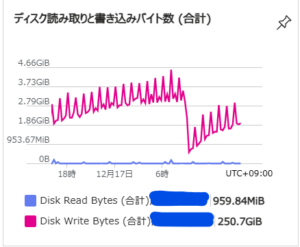
しかし、ディスクへの書き込み頻度と書き込みデータ量が大幅に減りました。
また、MySQLには大量のbinlogが溜まっていたというのもありますが、TimescaleDBの圧縮機能によってディスク消費量も大幅に減らすことができました。
おまけ
MySQLの最小構成のDocker Composeファイル
DBが初期化されるまで2,3分かかる(その前にアクセスすると異常な設定、みたいなエラーがでるのでしばらく待ち)
|
1 2 3 4 5 6 7 8 9 10 11 12 13 14 15 16 17 18 19 20 21 22 23 24 25 26 27 28 29 30 31 32 33 34 35 36 37 38 39 40 41 42 43 44 45 46 47 48 49 50 51 52 53 54 55 56 57 58 59 60 61 62 63 64 65 66 67 68 69 70 71 72 73 |
services: mysql-server: image: mysql:8.0-bookworm restart: always command: - --log-bin-trust-function-creators=1 - --character-set-server=utf8mb4 - --collation-server=utf8mb4_bin environment: MYSQL_DATABASE: {DB名} MYSQL_USER: {ユーザ名} MYSQL_PASSWORD: {パスワード} MYSQL_ROOT_PASSWORD: {rootパスワード} healthcheck: test: ["CMD", "mysqladmin", "ping", "-h", "localhost"] interval: 10s timeout: 5s retries: 5 volumes: - ./data:/var/lib/mysql - ./mysql_conf/:/etc/mysql/ ports: - 3306:3306 cap_add: - SYS_NICE zabbix-server: image: zabbix/zabbix-server-mysql:ubuntu-latest restart: always ports: - 10051:10051 environment: DB_SERVER_HOST: mysql-server # 上で定義したMySQLサービス名 MYSQL_DATABASE: {上で定義したDB名} MYSQL_USER: {同上} MYSQL_PASSWORD: {同上} volumes: - ./zabbix_conf/:/etc/zabbix depends_on: mysql-server: condition: service_healthy zabbix-web: image: zabbix/zabbix-web-nginx-mysql:ubuntu-latest restart: always ports: - 80:8080 environment: DB_SERVER_HOST: mysql-server # 上で定義したMySQLサービス名 MYSQL_DATABASE: {上で定義したDB名} MYSQL_USER: {同上} MYSQL_PASSWORD: {同上} ZBX_SERVER_HOST: zabbix-server # 上で定義したZbbixSeverサービス名 PHP_TZ: Asia/Tokyo depends_on: - zabbix-server zabbix-agent: image: zabbix/zabbix-agent:ubuntu-latest restart: always environment: ZBX_SERVER_HOST: zabbix-server # 上で定義したZbbixSeverサービス名 ZBX_SERVER: zabbix-server # Azureの仮想マシン上でdocker composeを使うと謎にsshが死ぬのでつけてる # 普通はいらない networks: default: ipam: driver: default config: - subnet: 192.168.1.0/24 # 競合しないプライベートIP範囲を指定 gateway: 192.168.1.1 |
TimescaleDB(PostgreSQL)の最小構成Docker Compose ファイル
今回の使用法におていは、テーブル変換をしない場合は普通のPostgreSQLと同じ動きをするので、通常版は割愛
|
1 2 3 4 5 6 7 8 9 10 11 12 13 14 15 16 17 18 19 20 21 22 23 24 25 26 27 28 29 30 31 32 33 34 35 36 37 38 39 40 41 42 43 44 45 46 47 48 49 50 51 52 53 54 55 56 57 58 59 60 61 62 63 64 65 66 67 68 69 70 |
services: postgres-server: image: timescale/timescaledb:2.22.1-pg17 restart: always environment: POSTGRES_USER: {ユーザ名} POSTGRES_PASSWORD: {パスワード} POSTGRES_DB: {DB名} ports: - 5432:5432 volumes: - ./postgres-data:/var/lib/postgresql/data zabbix-server: image: zabbix/zabbix-server-pgsql:ubuntu-latest restart: always environment: DB_SERVER_HOST: postgres-server # 上で定義したDBのホスト名 POSTGRES_USER: {上で定義したDBユーザ名} POSTGRES_PASSWORD: {上で定義したDBパスワード} POSTGRES_DB: {上で定義したDB名} ports: - 10051:10051 volumes: - ./zabbix_conf/:/etc/zabbix depends_on: - postgres-server healthcheck: test: ["CMD-SHELL", "pgrep zabbix_server"] interval: 10s timeout: 5s retries: 5 start_period: 20s zabbix-web: image: zabbix/zabbix-web-nginx-pgsql:ubuntu-latest restart: always environment: DB_SERVER_HOST: postgres-server # 上で定義したDBのホスト名 POSTGRES_USER: {上で定義したDBユーザ名} POSTGRES_PASSWORD: {上で定義したDBパスワード} POSTGRES_DB: {上で定義したDB名} ZBX_SERVER_HOST: zabbix-server PHP_TZ: Asia/Tokyo ports: - 80:8080 depends_on: - postgres-server - zabbix-server zabbix-agent: image: zabbix/zabbix-agent:ubuntu-latest restart: always environment: ZBX_SERVER_HOST: zabbix-server # 上で定義したZbbixSeverサービス名 ZBX_SERVER: zabbix-server # 上で定義したZbbixSeverサービス名 depends_on: zabbix-server: condition: service_healthy # azureの仮想マシン上でdocker composeを使うと謎にsshが死ぬのでつけてる # 普通はいらない networks: default: ipam: driver: default config: - subnet: 192.168.1.0/24 # 競合しないプライベートIP範囲を指定 gateway: 192.168.1.1 |
参考資料
- https://www.tigerdata.com/docs/use-timescale/latest/hypertables
- https://www.zabbix.com/documentation/current/jp/manual/appendix/install/timescaledb
- https://pgloader.readthedocs.io/en/latest/ref/mysql.html
- https://github.com/dimitri/pgloader/issues/1211
- https://qiita.com/11ohina017/items/4a808e4fc03e1ac890ba
- https://assets.zabbix.com/files/events/meetup_20200702/meetup_20200702_MySQL2PgSQL-ENG.pdf